

Across your client book
No separate subscription for each client ledger.
Keep the accounting work within your practice subscription. Practice-size bands still apply to your plan, and AI usage is metered.
Explore plans and AI creditsTake raw records through a reconciled ledger, working papers and a Special Purpose Financial Report. Fedix does not lodge; your practice chooses its lodgement software.
MYLEDGER / From records to reports
For the monthly accounts, the year-end file and the client with several years of simple accounts to catch up.
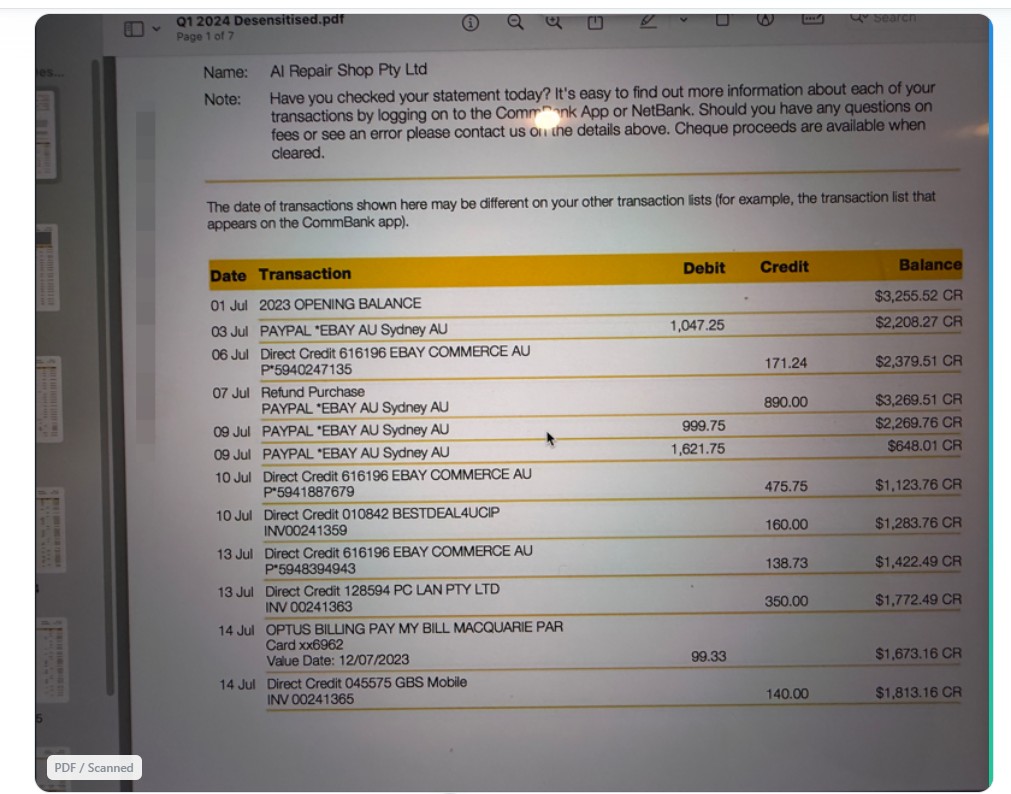
| Date | Transaction | Debit | Credit | Balance |
|---|---|---|---|---|
| 01 Jul | 2023 OPENING BALANCE | 3255.52 | ||
| 03 Jul | PAYPAL *EBAY AU Sydney AU | 1047.25 | 2208.27 | |
| 06 Jul | Direct Credit 616196 EBAY COMMERCE AU | 171.24 | 2379.51 | |
| 07 Jul | Refund Purchase PAYPAL *EBAY AU Sydney AU | 890.00 | 3269.51 | |
| 09 Jul | PAYPAL *EBAY AU Sydney AU | 999.75 | 2269.76 | |
| 09 Jul | PAYPAL *EBAY AU Sydney AU | 1621.75 | 648.01 | |
| 10 Jul | Direct Credit 616196 EBAY COMMERCE AU | 475.75 | 1123.76 | |
| 10 Jul | Direct Credit 010842 BESTDEAL4UCIP | 160.00 | 1283.76 | |
| 13 Jul | Direct Credit 616196 EBAY COMMERCE AU | 138.73 | 1422.49 | |
| 13 Jul | Direct Credit 128594 PC LAN PTY LTD | 350.00 | 1772.49 | |
| 14 Jul | OPTUS BILLING PAY MY BILL MACQUARIE PAR | 99.33 | 1673.16 | |
| 14 Jul | Direct Credit 045575 GBS Mobile | 140.00 | 1813.16 |
Interactive sample: move across the statement to reveal the extracted entries.
Stage 01
Start with the records your client actually has: bank statement PDFs, scanned pages, spreadsheets and receipts. Extract transaction data into a ledger you can work with.
A practical place to start
For clients with straightforward accounts, bring the available records together and work through each year in sequence. Import prior-year balances where available, review the coding and adjustments, then prepare the financial statements for each period.
Missing statements, unclear transactions and opening-balance differences still need investigation. MyLedger gives your team a preparation workflow; your accountant resolves the accounting treatment.
Across your client book
Keep the accounting work within your practice subscription. Practice-size bands still apply to your plan, and AI usage is metered.
Explore plans and AI creditsPart of the FEDIX family
Use Fedix Practice Manager for intake, engagement and document collection. Explore FediPilot, our AI assistant for existing MYLEDGER or FEDIX users after training, alongside the MyLedger workflow.
Raw records become a reconciled ledger, working papers and a Special Purpose Financial Report. Fedix does not lodge.
Turn bank statements, PDFs, Excel files, and screenshots into a drafted ledger, ready for your review.
AI learns your coding patterns and pre-codes the routine lines. Every line is still yours to review and approve.
Surfaces unusual transactions, duplicates, and missing entries so you can work through the exceptions first.
Division 7A schedules, depreciation and amortisation workings, and tax adjustment papers - all drafted for your review.
Custom categories with GST tracking, ITR label mapping, and practice default templates for consistency.
Complete journal entry management with pre-built templates for Income Tax, PAYG, Superannuation, and more.
Generate Balance Sheets, Income Statements, Trial Balance, BAS Summary, and ITR Reports with period comparisons.
Retrieve client information, accounts, lodgements and due dates. GST, PAYG and tax payments are matched against your ledger and the differences surfaced for your review.
Connect directly to bank feeds for real-time transaction import. Supports multiple Australian banks.
Upload receipts in bulk and automatically match them to transactions. AI extracts receipt data and links documents to ledger entries seamlessly.
Everything you need to automate your accounting workflow
From bank statement to financial statement in five simple steps
Import data from any format—CSV, PDF, Excel, screenshots, or direct Open Banking feeds. MyLedger handles multiple file types and processes them automatically.

OCR and AI extract the transaction data and draft the coding from your learned patterns. Review and adjust the suggestions before you approve them.
The AI analyses transactions and pre-codes the routine lines from your learned patterns. This workflow is configured for batch review and approval before posting.
Fedix matches GST, BAS lodgements, tax payments and account balances against the ATO's records and surfaces the differences. You review each difference and decide the treatment.
Export professional financial statements, working papers, and reports once you have reviewed them. Balance Sheets, P&L, Trial Balance, and BAS summaries.

Works seamlessly with your existing tools and workflows
Perfect for different client types and accounting scenarios
Process monthly bank statements, reconcile transactions, and prepare financial reports in one connected workflow.
Year-end financial statements, tax workings, and working papers drafted from your reconciled ledger, ready for your review.
GST matched against the ATO's records and summarised for you - the numbers behind your BAS, ready to carry into your own lodgement software.
Handle company financial statements, profit appropriation, dividend statements, and Division 7A loans.
Manage trust distribution statements, beneficiary allocations, and trust-specific reporting requirements.
Generate partnership financial statements, member benefit statements, and partnership-specific reports.
What changes in your workflow
Coding arrives drafted
You approve it
Unusual items surfaced up front
Your judgement, where it counts
Nothing is posted until you approve it
Prepared by Fedix. Signed by you.
Dive deeper into specific capabilities
Watch the workflow, explore the plans and discuss your practice’s needs. Prepared by Fedix. Signed by you.